WINONO: A Nonogram Game for Windows 3.1 and Up

Good evening,
I created a Win32 nonogram game that runs on all versions of Windows from Windows 3.1 (with Win32s) up to Windows 11. As far as I could tell, there were no prior nonogram games for Windows 3.1 (unless you happen to know one?)
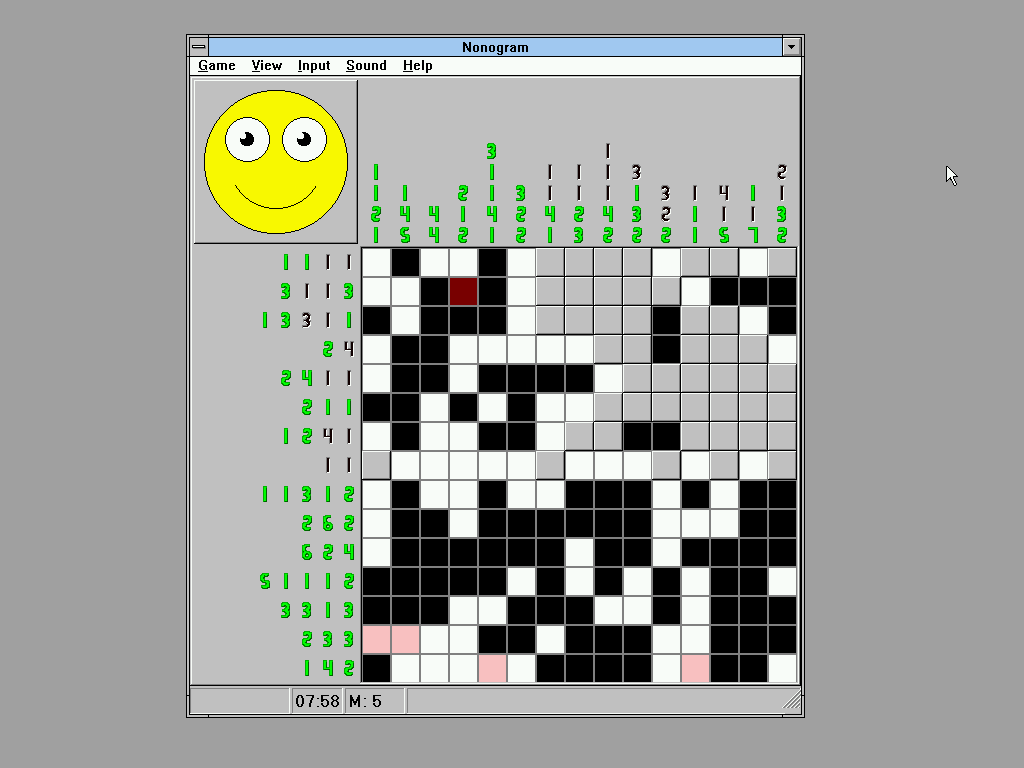
The game is optimised enough to run okay on the slowest 32-bit x86 processor: an i386SX/16. It's not brilliant, but just about playable.
You can find more info and a download on the game's itch.io page.
The source code is available on GitLab.
I hope this game brings you some enjoyment on Windows 3.1, and that you find it interesting. I may record some videos about its development if time allows (and if anyone cares whatsoever). If you have any questions, feel free to ask!
I did use ChatGPT during development, but not a single line of source code was generated by it. Instead, I used the AI like a natural language search engine, or a forum post with instant responses (and endless patience for silly beginner questions). The AI usage encompassed the following:
Overall, the takeaways are what you would expect: It was helpful for basics of Win32 programming that apply to this day (and that are in its training data). When confronted with old Windows quirks, on one occasion it did find an old workaround on the internet (emulating WM_MOUSELEAVE). However, in most cases, it tended to fail and just take wild guesses whenever it was confronted with the quirks of old Windows verisons, especially when it came to Win32s. So I still tumbled down my fair share of rabbit holes, don't you worry about that ;-)
I certainly feel confident in Win32 programming now, especially as I had ample opportunity to put this to the test when writing helper applications for development.
Good night!
I created a Win32 nonogram game that runs on all versions of Windows from Windows 3.1 (with Win32s) up to Windows 11. As far as I could tell, there were no prior nonogram games for Windows 3.1 (unless you happen to know one?)
The game is optimised enough to run okay on the slowest 32-bit x86 processor: an i386SX/16. It's not brilliant, but just about playable.
You can find more info and a download on the game's itch.io page.
The source code is available on GitLab.
I hope this game brings you some enjoyment on Windows 3.1, and that you find it interesting. I may record some videos about its development if time allows (and if anyone cares whatsoever). If you have any questions, feel free to ask!
Okay, but did you write this or did ChatGPT?
All assets (the smiley, the icon, cursor and digit font), simplistic as they are, are entirely man-made.I did use ChatGPT during development, but not a single line of source code was generated by it. Instead, I used the AI like a natural language search engine, or a forum post with instant responses (and endless patience for silly beginner questions). The AI usage encompassed the following:
- Asking whether a library function for something I wanted to do (e.g., writing to an INI file) already existed.
- Asking for general examples on how to use certain functions when I didn't understand the reference documentation.
- Describing my own algorithmic intentions and asking if the AI had any objections or suggestions for improvement, to avoid spending time building a square wheel when a round one was already invented.
Overall, the takeaways are what you would expect: It was helpful for basics of Win32 programming that apply to this day (and that are in its training data). When confronted with old Windows quirks, on one occasion it did find an old workaround on the internet (emulating WM_MOUSELEAVE). However, in most cases, it tended to fail and just take wild guesses whenever it was confronted with the quirks of old Windows verisons, especially when it came to Win32s. So I still tumbled down my fair share of rabbit holes, don't you worry about that ;-)
I certainly feel confident in Win32 programming now, especially as I had ample opportunity to put this to the test when writing helper applications for development.
Good night!
Comments
These "AI" slopbuckets are sort of ok-ish for researching and making templates, but unless it is something that has been done thousands of times before, it won't really do it for you. (But any day now! We proooommise!)
It's sadly hilarious, ask it about a vintage software product, and it will just slopquote what I have written about it here on Winworld (fluffing up a three line description to multiple pages that says nothing) or giving a multi-page description of what using a DOS program was like if it can't actually find anything.
<I don't expect anyone to read this wall of text, but had wanted to give an account of my experience with AI in this project without it dominating the game's introductory post, and figured responding to your comment was a good opportunity.>
I have a mixed stance on AI. Telling it to make stuff without even trying to understand the output is something you don't gain from. So even if the AI could have generated WINONO for me (unlikely), I wouldn't have wanted that because I wanted to make a Win3.1 game, not just have one. Though, after months of learning Win32 and the quirks of old Windows versions, I was glad Win32s exists so I didn't also have to learn about Win16's segmented memory model
That said, as I did use ChatGPT during development, I figured I may as well give an account of my positive and negative experiences.
Where AI was helpful
There were also problems I probably wouldn't have solved without AI assistance. For example, I used an old version of FontForge to create a Win3.1-compatible TrueType font (TTF), and ChatGPT successfully walked me through configuring and troubleshooting Cygwin (a Unix subsystem for Windows) and the old FontForge despite numerous age-related difficulties. Granted, it pulled all this info from pre-existing guides and manuals, but even if I had found those by myself, finding all the relevant info would have taken far longer (easily a week instead of a day), and I may just have given up.
Furthermore, I have to admit that there were occasions where the AI "knew" better than me and I initially dismissed its advice only to later follow it. For example, to make the reusable, scalable grid component, I initially had the idea of giving it an array of brushes and an array of pens, and using a sentinel pen value of NULL in a cell to use DrawEdge()* instead. This seemed to me a fast, flexible and relatively space-efficient solution. However, I quickly realised that for the grid to be reusable, there would have to be a way to parametrise the DrawEdge() call. When I asked ChatGPT, it suggested early on to just use callbacks for drawing the cells, but I rejected this as I was worried that resolving callbacks during painting would be too much overhead.
I settled for a solution where each cell would just have the index of a cell style which would then contain the parameters for the brush, pen or DrawEdge() call. This fit my current use case for a while, but as I started considering future games I might want to make with the grid (not a promise), I eventually realised that it would be most flexible to just have a rendering callback after all, instead of a cell style with a million parameters. Moreover, by that point, my grid was pre-rendering all the cell styles into bitmaps anyways, so the overhead for the callback would only be incurred whenever the window was resized, and only once for each cell style (instead of for every cell), which made the callback overhead negligible.
Where AI was not helpful
ChatGPT would also just deny that some features (certain Win32 functions, profiling in Visual C++ 4.1) were available, just because it assumed the program in question was too old.
Furthermore, ChatGPT sometimes flat-out lied about things it could have known better.
- It claimed that quotes in resource scripts were escaped as they are in normal C strings, so \", which wasn't working for me. I eventually found the Microsoft documentation and you actually have to duplicate them.
- It claimed that the DrawText() function could bottom-align multiline text, when the documentation explicitly states that this only works for single-line text.
Probably my worst experience was asking how to know the height of a label (or "static control" as it's called in Win32). ChatGPT showed me how to obtain the text metrics of a label's font, which itself is queried with the WM_GETFONT message. The code snippet it gave me was this:HDC hdc = GetDC(hwndLabel); // Get DC for label window HFONT hFont = (HFONT)SendMessage(hwndLabel, WM_GETFONT, 0, 0); if (hFont == NULL) { // No font set, get default GUI font hFont = (HFONT)GetStockObject(DEFAULT_GUI_FONT); } HFONT hOldFont = (HFONT)SelectObject(hdc, hFont);That looked perfectly reasonable: use a fallback if no font is set, so it wouldn't have crossed my mind to check the reference documentation. If anyone is reading this (as if), why don't you have a look and try to predict what the issue will have been?Much later, I noticed labels being misaligned, and the queried font height didn't match the visible pixels on screen at all. I spent an entire day troubleshooting this and almost went mental, as I couldn't find any solution by googling, and ChatGPT was of no use either.
Mind you, I didn't know whether the measured font height was actually wrong or if I just had to do some math on it, especially as ChatGPT insisted that the problem was because GetTextMetrics() returns values in logical units instead of pixels. However, it kept telling me to do calculations on the values that would obviously cancel out (something like multiplying with and dividing by the same value with no other operations in between), and when I told it that, it gave me the usual "Good catch! And you're absolutely right to push back on this/call this out", explained the problem I had just pointed out (i.e., basic arithmetic), and then "corrected" its anwswer to the exact same pointless math in a different order.
Eventually, I tried to see what would happen if I just removed the font fallback from the measuring code, and suddenly the text metrics were exactly as expected. See, it turns out that NULL in response to WM_GETFONT does not mean "no font" but "system font", and the system font may not be the same as the variable DEFAULT_GUI_FONT, especially if DPI scaling is active. Worse yet, fonts don't stay selected into device contexts (DCs) after the DC is released, so when the label was actually drawn, it had reverted to the system font; otherwise, I would have seen that one label's font differs from the others.
Conclusion
As I developed WINONO and ChatGPT became less useful, I learned to appreciate and increasingly rely on the excellent reference documentation that came with older versions of Visual Studio and Visual C++. Notably, these contain information that is not present on the Microsoft website (anymore?), such as the Windows version that any given function was added in (mostly accurate), including a page "functions by release", or, in VC++ 4.1, info on Win32s quirks. What I couldn't find in the reference documentation, I found in ancient forum posts, usenet groups, or established by experimentation, sharing the results here.So to me the bottom line is that AI can introduce you to a topic, generally point you in the right direction and be a useful tool for quickly sifting through mountains of information, but it can also give you red herrings and send you on wild goose chases until you decide you'll just have to research and experiment on your own.
In my ideal world, people would be using AI as a learning aid, to gain knowledge that can also be applied when the AI is down. Without wanting to speak too highly of myself, I'd like to think that I used it accordingly. Now it's certainly possible that I would have benefitted more from not asking AI at all, instead doing more "manual" googling and reading of reference material; I would likely have come across more information that, while not immediately useful, may have come in handy later. However, it's also possible that I would have eventually got stuck on a frustrating problem and, unable to find a solution for too long, given up, as in some past projects.
At any rate, the project was fun and I did learn a lot, so I suppose it wasn't a complete failure.
Good night.
*DrawEdge() is one of those functions that I had discovered by asking ChatGPT whether a function for my use case (i.e., making a 3D border like that on a button) existed in Win32.