Software Spotlight: Softcard CP/M for the Apple II

Many are familiar with the Apple II series computers and their 6502 CPU software base. But did you know that in 1980, Microsoft, of all companies, released a Z-80 co-processor card for the Apple II that enabled it to run CP/M?
This opened up the doors for an existing Apple II to run 8080/Z-80 based CP/M software. This included business software such as dBase, WordStar, SuperCalc, CalcStar, Turbo Pascal, as well as Microsoft's own development languages.
But putting CP/M software on an Apple II is rather an odd fit.
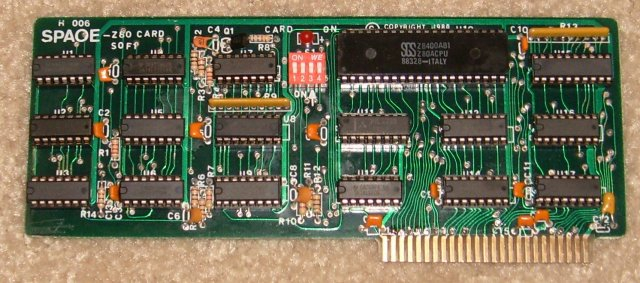
The co-processor card is fairly simplistic - all of the logic chips are standard 74-series that can still be bought new. It operates by taking over the Apple II bus I/O. It uses the Apple II's RAM, but specially "mapped" for use by the Z-80, including the normally non-contiguous 16k "language card" memory.
The Z-80 only runs at a fraction of its full rated speed. But due to the existing overhead of using the Apple II's bus, a theoretical full speed would not give you much more.
Apple II CP/M software uses the same single-sided 35-track "140k" GCR low-level format as other Apple II software. That means Flux tools will have the same reading/writing headaches as any other Apple II disks. But that also means they can be transferred via ATD Pro.
The disks use a CP/M file system, rather than AppleSoft DOS or ProDOS file systems. There were many other file systems used on the Apple II, but this would have meant extra hassle trying to share data with other Apple II programs.
Back in the day, most vendor's CP/M systems used incompatible floppy disk formats, but the Apple II's GCR format, rather than typical FM/MFM, made any kind of disk import/export tool impossible.
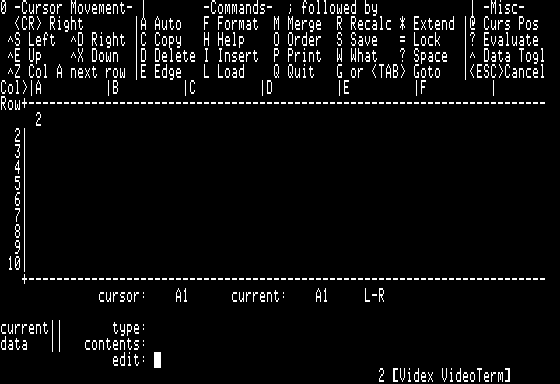
The CP/M system provided with the CP/M Softcard can make use of Apple's standard 40-column text mode. However, most CP/M software was designed for 80-column text. This meant that effectively, an Apple II+ required the addition of a Videx (or similar) 80-column card.
Compared to Z-80 based systems designed specifically to run CP/M, this was rather constrained. But if one had already invested in an Apple II, this was a relatively inexpensive way to add more functionality.
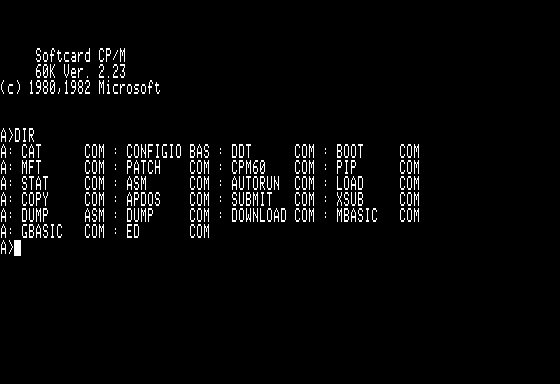
Apparently, for a brief time, these Z-80 cards were fairly popular.
Some Apple II Plus clones included Softcard compatible Z-80 hardware built on to their motherboard. There were also some more powerful Z-80 co-processor cards developed, with enhancements such as their own faster built-in RAM, and access to larger capacity floppy drives.
The original Softcard was designed for the Apple II Plus, but should also function in a IIe, Franklin, or even a Laser 128, (Not an Apple IIc, as they have no expansion slots, and seemingly not compatible with IIGS).
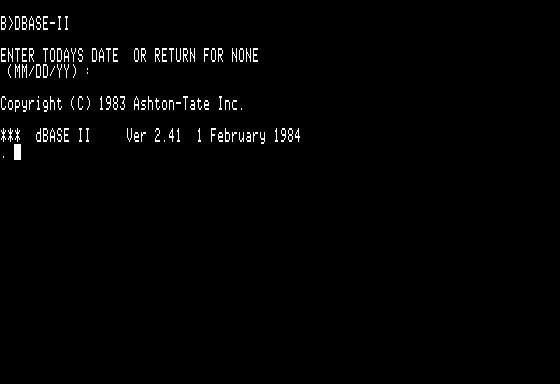
When these were new, the option of using CP/M-80 opened the flood gates to a large body of existing software. Although transferring files would be very tricky, one could transfer "well behaved" binary programs from other CP/M-80 systems and run them as-is, or with minimal terminal type configuration.
As time passed, CP/M systems were overtaken by MS-DOS, and Apple II users focused on 6502 native software that made better use of the Apple II's hardware.
There is a collection of Apple II CP/M-80 software on the old Asimov archive:
https://mirrors.apple2.org.za/ftp.apple.asimov.net/images/cpm/
Some of them may have identical file contents to other CP/M-80 platform distributions, but some may have custom configurations specific to the Apple II.
There had been a number of commercial Apple II CP/M titles pop up on eBay this last year. That has included the big titles: dBase, WordStar, SuperCalc, and Borland Turbo Pascal, but I had also spotted a commercial package of the Personal Pearl database for Apple II that looked like it was a CP/M version.
Off hand, Winworld has good dumps of CalcStar https://winworldpc.com/product/calcstar/1x and now dBase https://winworldpc.com/product/dbase/ii-v2x
By the way, one tip: if you are trying to get a real CP/M Z-80 MS or clone Softcard running, start your testing with the later updated CP/M 2.23, not the original release. I was trying to get a Z-80 card working, and it had constant totally random disk access errors until I switched to the later version.
This opened up the doors for an existing Apple II to run 8080/Z-80 based CP/M software. This included business software such as dBase, WordStar, SuperCalc, CalcStar, Turbo Pascal, as well as Microsoft's own development languages.
But putting CP/M software on an Apple II is rather an odd fit.
The co-processor card is fairly simplistic - all of the logic chips are standard 74-series that can still be bought new. It operates by taking over the Apple II bus I/O. It uses the Apple II's RAM, but specially "mapped" for use by the Z-80, including the normally non-contiguous 16k "language card" memory.
The Z-80 only runs at a fraction of its full rated speed. But due to the existing overhead of using the Apple II's bus, a theoretical full speed would not give you much more.
Apple II CP/M software uses the same single-sided 35-track "140k" GCR low-level format as other Apple II software. That means Flux tools will have the same reading/writing headaches as any other Apple II disks. But that also means they can be transferred via ATD Pro.
The disks use a CP/M file system, rather than AppleSoft DOS or ProDOS file systems. There were many other file systems used on the Apple II, but this would have meant extra hassle trying to share data with other Apple II programs.
Back in the day, most vendor's CP/M systems used incompatible floppy disk formats, but the Apple II's GCR format, rather than typical FM/MFM, made any kind of disk import/export tool impossible.
The CP/M system provided with the CP/M Softcard can make use of Apple's standard 40-column text mode. However, most CP/M software was designed for 80-column text. This meant that effectively, an Apple II+ required the addition of a Videx (or similar) 80-column card.
Compared to Z-80 based systems designed specifically to run CP/M, this was rather constrained. But if one had already invested in an Apple II, this was a relatively inexpensive way to add more functionality.
Apparently, for a brief time, these Z-80 cards were fairly popular.
Some Apple II Plus clones included Softcard compatible Z-80 hardware built on to their motherboard. There were also some more powerful Z-80 co-processor cards developed, with enhancements such as their own faster built-in RAM, and access to larger capacity floppy drives.
The original Softcard was designed for the Apple II Plus, but should also function in a IIe, Franklin, or even a Laser 128, (Not an Apple IIc, as they have no expansion slots, and seemingly not compatible with IIGS).
When these were new, the option of using CP/M-80 opened the flood gates to a large body of existing software. Although transferring files would be very tricky, one could transfer "well behaved" binary programs from other CP/M-80 systems and run them as-is, or with minimal terminal type configuration.
As time passed, CP/M systems were overtaken by MS-DOS, and Apple II users focused on 6502 native software that made better use of the Apple II's hardware.
There is a collection of Apple II CP/M-80 software on the old Asimov archive:
https://mirrors.apple2.org.za/ftp.apple.asimov.net/images/cpm/
Some of them may have identical file contents to other CP/M-80 platform distributions, but some may have custom configurations specific to the Apple II.
There had been a number of commercial Apple II CP/M titles pop up on eBay this last year. That has included the big titles: dBase, WordStar, SuperCalc, and Borland Turbo Pascal, but I had also spotted a commercial package of the Personal Pearl database for Apple II that looked like it was a CP/M version.
Off hand, Winworld has good dumps of CalcStar https://winworldpc.com/product/calcstar/1x and now dBase https://winworldpc.com/product/dbase/ii-v2x
By the way, one tip: if you are trying to get a real CP/M Z-80 MS or clone Softcard running, start your testing with the later updated CP/M 2.23, not the original release. I was trying to get a Z-80 card working, and it had constant totally random disk access errors until I switched to the later version.