OFFER!!... MED SoundStudio 2.1 Win32 - Funky Tracker With Easy Command System Free Since 2017>>>

Looks like somebody uploaded my archive of MED 2.1 to archive.organism from the oldschooldaw days-
https://archive.org/details/med-soundstudio-v2.1
They did not get all the HiLife instruments I made just some... But you get more there than on the developers upload which has been available since 2017-
https://drive.google.com/file/d/1uxz4yc4q_ZemnrqIUNBFcyJ3RSwp_FPN/edit
You can get it there if you are more comfortable, there's also a facebook thingy... I don't use facebook nor arsebook-
https://web.archive.org/web/20220328205147/https://facebook.com/groups/4837052308/
But fortunately my original posting at oldskool is still viewable so there are many images there no sense in uploading here-
https://web.archive.org/web/20220328205147/oldschooldaw.com/forums/index.php/topic,7301.0.html
Yeah... It's a TRACKER... Which will scare many off but it shouldn't... In many ways they are easier & more versatile than piano rollers as you have a total spreadsheet seeing how things line up & editing locally or globally at will...
In the case of MED what makes it kool is that you just select a desired range on a track then RT-Click then choose a command then adjust parameters...DONE!... No commands to memorize it's damn near as fast as drawing an envelope...
Here is in MED 1.2 (I use 1.2 & 2.1... no confusion)-
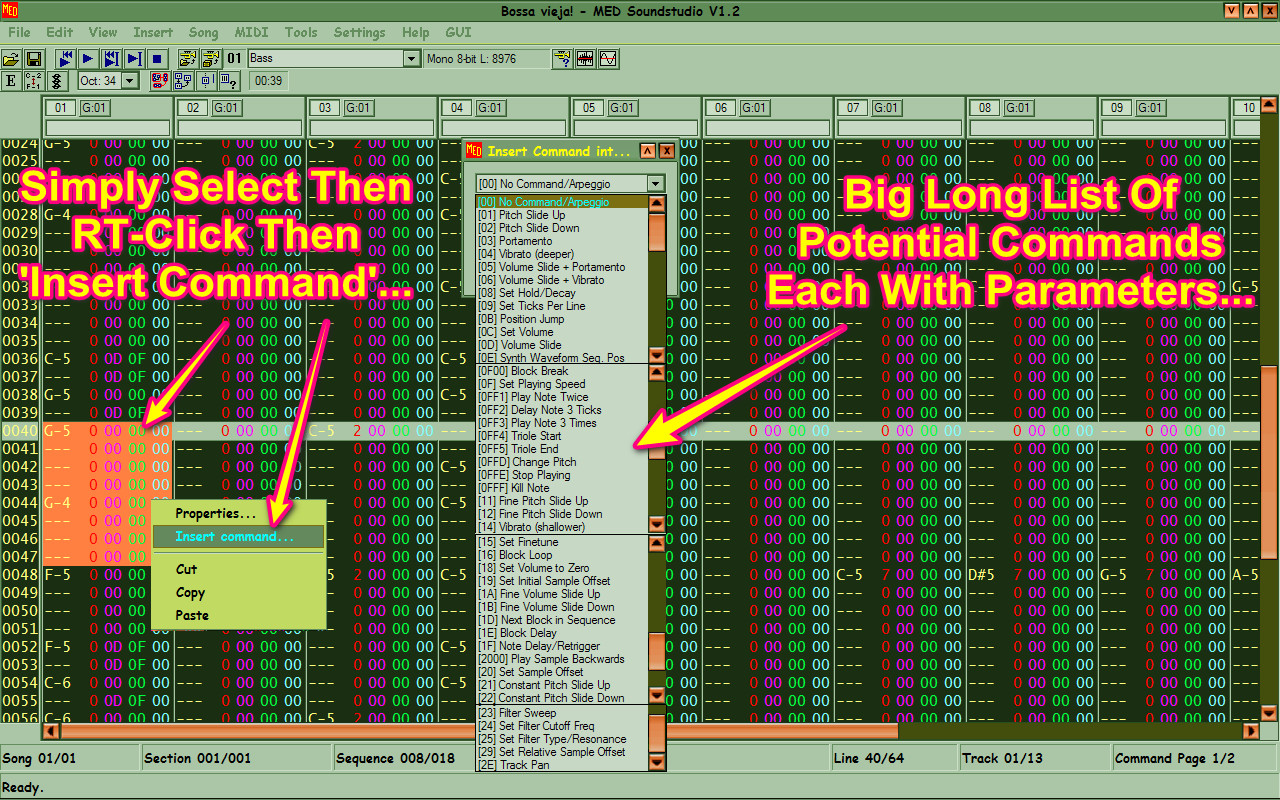
As you see a buttload of available commands, here a better look-
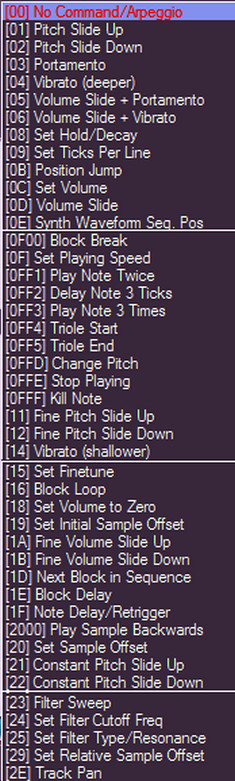
These are same in both versions... 2.1 there was added the HighLife engine plus VSTi-VST usage... With the HighLife engine one can sample a VSTi to a HiLife file so something high CPU can be made low CPU... You can choose how much quality like every 4 semitones or EVERY semitone if desired...
The issue with the HighLife engine is that when scanning plugins some will detect the HighLife engine as a debugger & refuse to scan thus crash... other than this the scanning is pretty decent but it does create a problem actually getting THRU the scan...
Here's how I do it... Usually my default VST folder is C:/Program Files/VSTplugins & that is what shows up in Regedit... So what I do is make another folder in there called 'Main' & put ALL plugs in there so now it's C:/Program Files/VSTplugins/Main same in regedit...
OK when starting MED one must stare intensely at the scanning process dialog looking to see what is being scanned as for when it hangs on a bad one the crash dialog will pop-up a split second later so in that case you MOVE that plugin to the PARENT folder... It's still in your plugin path as most music app have their own dialogs where you can assign C:/Program Files/VSTplugins...
If you can't see the dialog well then use a screen magnifier...
That's the worst part... MED actually handles a variety of solid synths like-
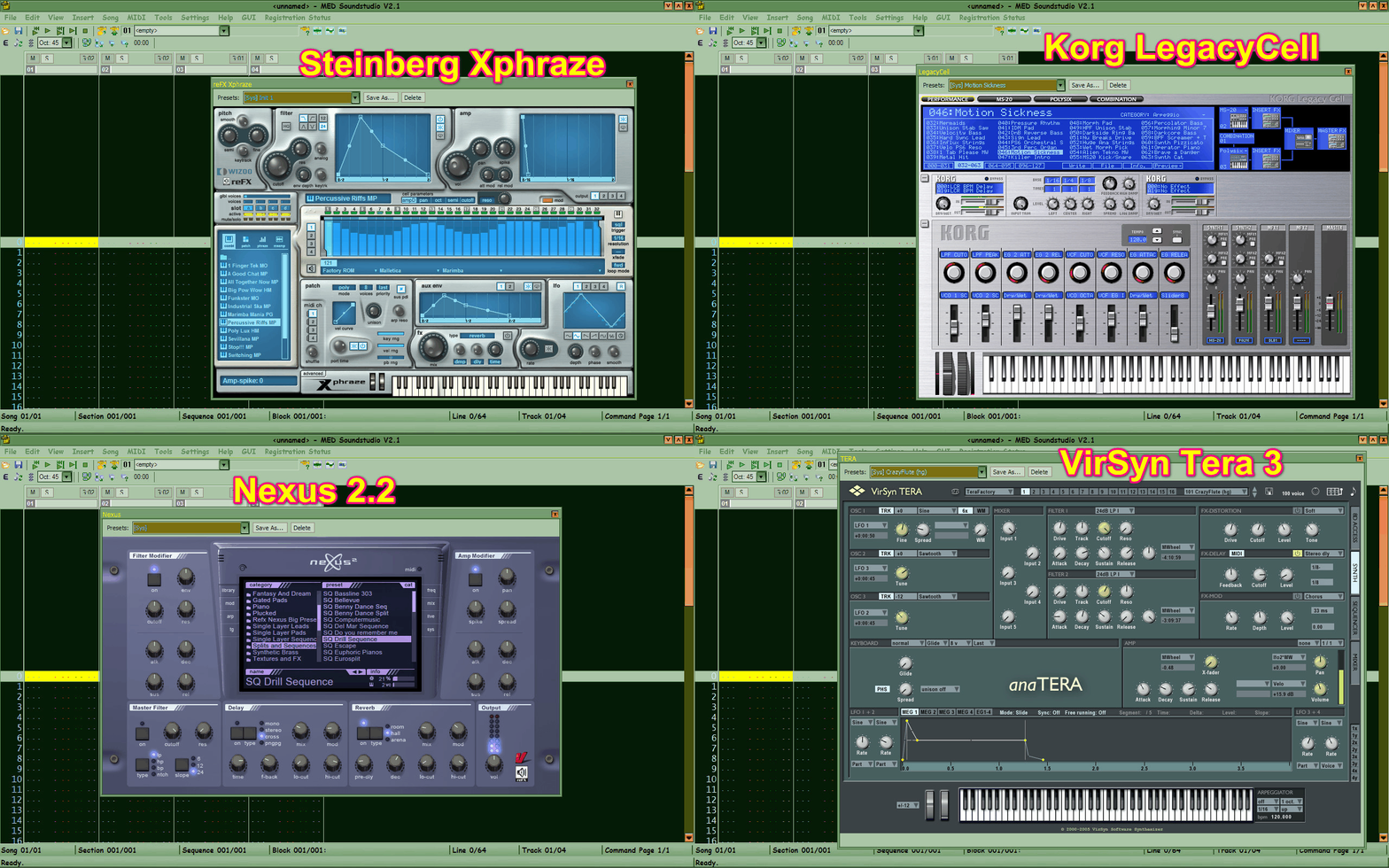
LegacyCell is not liked by many sequencers glad to see it fine in MED as I really like LegacyCell...
'BEST PRACTICES' workflow...
MED shines in manipulating SAMPLE instruments in musical & unorthodox fashion also easily... So I like this method using MODERN HiQ samples I make myself not the dullard old stuff then you can finish up using FX but you have option of VSTi or HiLife or SynthSound or full MIDI out capability as well as sampling a VSTi to sample file...
I use MED 1.2 with MIDI out to VirSyn Soft Synth & DreamStation using LoopMIDI... Sounds great & no strain on MED-


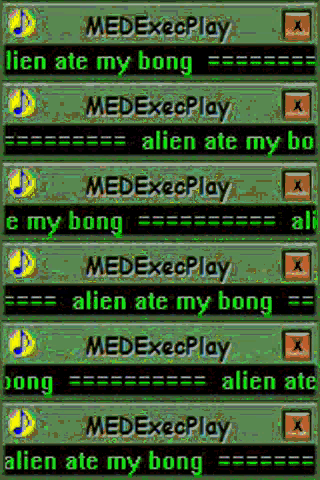
Another kool feature is the ability to save song as an EXE which is simple self-playing, I guess back in the day this provided some protection against either decompiling the song file or stealing the song... I guess they didn't know how to record from sound card?... This was a new feature in MED 1.2 (2000)-
https://archive.org/details/med-soundstudio-v2.1
They did not get all the HiLife instruments I made just some... But you get more there than on the developers upload which has been available since 2017-
https://drive.google.com/file/d/1uxz4yc4q_ZemnrqIUNBFcyJ3RSwp_FPN/edit
You can get it there if you are more comfortable, there's also a facebook thingy... I don't use facebook nor arsebook-
https://web.archive.org/web/20220328205147/https://facebook.com/groups/4837052308/
But fortunately my original posting at oldskool is still viewable so there are many images there no sense in uploading here-
https://web.archive.org/web/20220328205147/oldschooldaw.com/forums/index.php/topic,7301.0.html
Yeah... It's a TRACKER... Which will scare many off but it shouldn't... In many ways they are easier & more versatile than piano rollers as you have a total spreadsheet seeing how things line up & editing locally or globally at will...
In the case of MED what makes it kool is that you just select a desired range on a track then RT-Click then choose a command then adjust parameters...DONE!... No commands to memorize it's damn near as fast as drawing an envelope...
Here is in MED 1.2 (I use 1.2 & 2.1... no confusion)-
As you see a buttload of available commands, here a better look-
These are same in both versions... 2.1 there was added the HighLife engine plus VSTi-VST usage... With the HighLife engine one can sample a VSTi to a HiLife file so something high CPU can be made low CPU... You can choose how much quality like every 4 semitones or EVERY semitone if desired...
The issue with the HighLife engine is that when scanning plugins some will detect the HighLife engine as a debugger & refuse to scan thus crash... other than this the scanning is pretty decent but it does create a problem actually getting THRU the scan...
Here's how I do it... Usually my default VST folder is C:/Program Files/VSTplugins & that is what shows up in Regedit... So what I do is make another folder in there called 'Main' & put ALL plugs in there so now it's C:/Program Files/VSTplugins/Main same in regedit...
OK when starting MED one must stare intensely at the scanning process dialog looking to see what is being scanned as for when it hangs on a bad one the crash dialog will pop-up a split second later so in that case you MOVE that plugin to the PARENT folder... It's still in your plugin path as most music app have their own dialogs where you can assign C:/Program Files/VSTplugins...
If you can't see the dialog well then use a screen magnifier...
That's the worst part... MED actually handles a variety of solid synths like-
LegacyCell is not liked by many sequencers glad to see it fine in MED as I really like LegacyCell...
'BEST PRACTICES' workflow...
MED shines in manipulating SAMPLE instruments in musical & unorthodox fashion also easily... So I like this method using MODERN HiQ samples I make myself not the dullard old stuff then you can finish up using FX but you have option of VSTi or HiLife or SynthSound or full MIDI out capability as well as sampling a VSTi to sample file...
I use MED 1.2 with MIDI out to VirSyn Soft Synth & DreamStation using LoopMIDI... Sounds great & no strain on MED-
Another kool feature is the ability to save song as an EXE which is simple self-playing, I guess back in the day this provided some protection against either decompiling the song file or stealing the song... I guess they didn't know how to record from sound card?... This was a new feature in MED 1.2 (2000)-